Posts

Showing posts with the label Blogspot

Cara Mengekspor Posting Blogspot

Image
Cara Mengekspor Posting Blogspot - Google Blogger, juga dikenal sebagai Blogspot, mengubah penjelajah Web biasa menjadi reporter Internet yang luar biasa. Jika Anda menggunakan Blogspot untuk membuat posting yang informatif atau menghibur, Anda mungkin ingin membacanya secara offline. Unduh komentar dan pos blog Anda ke komputer dengan cepat menggunakan fitur Ekspor Blogspot . Metode yang Anda gunakan untuk melakukan ini bergantung pada versi Blogspot yang Anda gunakan; Google menyediakan versi yang ditingkatkan untuk blogger pada tahun 2011. Menggunakan Antarmuka Lama 1. Arahkan ke beranda Blogspot Anda dan temukan blog yang ingin Anda ekspor di bagian Kelola Blog pada laman. 2. Klik link "Pengaturan" di samping blog yang diinginkan dan pilih "Ekspor Blog" untuk membuka halaman Ekspor Blog Anda. 3. Klik tombol "Unduh Blog" untuk membuka jendela pop-up. Klik tombol radio "Simpan File" pop-up dan klik "Oke". 4. Ketik nama untuk file ...


Beginning Google Blogger

Image
Are you interested in starting a blog but can’t decide on which service to use? Google’s Blogger offers many advantages over other blog publishing systems, including seamless integration with Google services and web applications. Beginning Google Blogger is a complete resource on how to create and manage a blog using Blogger. The book offers step-by-step instructions and visual aids which walk you through both the basics of Blogger and the advanced features it offersâ?"from creating a new blog and choosing fonts and colors, and installing custom blog graphics; to converting from a 2-column to a 3-column layout, setting up a domain name and creating an online store with a built-in navigational bar. The journey from newbie to experienced blogger will be fun and challenging. You’ll learn practical applications of the most popular gadgets, search engine optimization tips, how to make money using Blogger, and, overall, taking blogging to a new level by incorporating social network...

Visual QuickProject Guide - Publishing a Blog with Blogger

Image
Publishing a Blog with Blogger: Visual QuickProject Guide Publisher: Peachpit Press | ISBN: 0321321235 | edition 2005 | CHM | 144 pages | 17,6 mb If you want to start blogging fast, but don’t want to get sidetracked by the details, then you need a Visual QuickProject Guide! Writing in a journal is all well and good, but when you're ready to share your musings with the world (and you think the world is ready to receive them!), a blog is the way to go. For just $12.99, this compact guide shows you how! Using big, bold full-color pictures and streamlined instructions, it covers just the need-to-know essentials that will get you blogging with leading free blog software--Google’s Blogger--in a matter of minutes. Best-selling author Elizabeth Castro takes you through each step of the blogging process--from acquainting you with the interface to setting up your blog, creating your profile, posting email, adding pictures and audio, and more. Occasional sidebars and tips point out other...

Blogger Template : Revolution Lifestyle

Image
Revolution Lifestyle Blogger Template 100% working, Premium Blogger Template DOWNLOAD

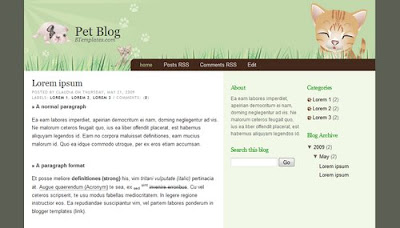
Blogger Template : Pet Blog (premium)

Image
PREVIEW | DOWNLOAD

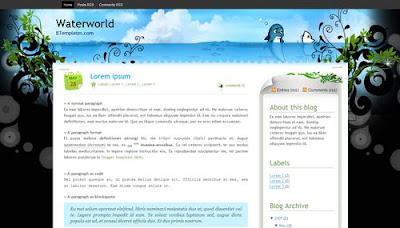
Blogger Template : Waterworld

Image
PREVIEW | DOWNLOAD

Tambahkan Yahoo Smiley emoticon Pada Blogger / BlogSpot Halaman Komentar

Image
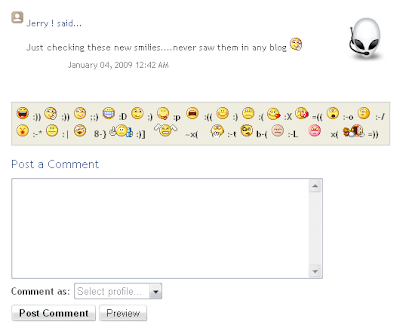
Menambahkan yahoo emoticons pada platform blogger ternyata tak semudah yg saya perkirakan sebelumnya..meski hanya memerlukan ketabahan dan kesabaran dalam melihat HTML kode template anda.. juga diperlukan sedikit kopi hangat dan sebatang rokok..wawwww.. nikmat..hehehe ok.. langsung aja, tampilannya akan seperti ini: langkah -langkahnya sebagai berikut: 1. masuk ke account blogger anda 2. layout -> EDIT HTML tab centang Expand Widget Templates 3. Cari kode berikut : <b:if cond='data:post.embedCommentForm'> <b:include data='post' name='comment-form'/> 4. selanjutnya copy kode dibawah ini, dan paste diantara kedua HTML kode Diatas <div style='-moz-background-clip: -moz-initial; -moz-background-origin: -moz-initial; -moz-background-inline-policy: -moz-initial; width: 369; text-align: left; border: 1px solid #cccccc; padding: 5px; background: #eeeddf; height:86'> <b> <img border='0' height='18' src=...

Shoutbox Pada Blogspot

Shoutbox merupakan salah satu aksesoris yang paling umum ditampilkan di dalam Blog sebagai sebuah gadget blogspot . Aksesoris ini digunakan untuk memberikan kesempatan kepada pengunjung untuk berkomentar secara bebas. Penyedia shoutbox gratis di internet, antara lain oggix.com , shutmix.com , dan myshoutbox.com . Umumnya, proses untuk memperoleh aksesoris tersebut cukup mudah. Sebagai contohnya, untuk memperoleh shoutbox dari oggix.com , Anda hanya perlu mengunjungi situs tersebut dan melakukan registrasi di sana. Setelah registrasi selesai, Anda akan diminta login dan memilih menu “Install ShoutBox”. Selanjutnya pilih “ HTML Code ” untuk memilih jenis dan tampilan shoutbox. Setelah proses di atas selesai, Oggix.com akan menampilkan kode Javascript untuk menampilkan shoutbox yang telah Anda pilih. Blok kode tersebut dengan mouse dan salinlah dengan menggunakan Ctrl+C. Jika Anda pemilik Blogger.com, masukkan kode Javascript melalui tabulasi Template dan pilih link “ Page Elements ...